Document evidence from start to finish in a single app. Import photos, videos, scanned documents, body camera footage, drone media, screenshots, and supporting documents while preserving available GPS metadata and timestamps when present in the imported file. Organize evidence into professional reports on iPhone, iPad, or Mac — all without third-party servers.
Import evidence on iPhone or iPad, then continue your work on Mac with optional iCloud Sync. Works completely offline in the field.
Built for professionals in
Cases, evidence, billing, tasks, calendar, and reports available across your workflow, with optional iCloud Sync for supported information.
Priority alerts, active cases, billing overview, today's tasks, calendar events, and recent evidence — all at a glance. Total billable shown live.
Every photo, scan, video and document organized by client and case. GPS indicators show which items have location data.
Track billable hours, mileage, and expenses across active cases. Export PDF or Word invoices with one tap.
Investigation reports as PDF and Word with priority flagging. See exactly which cases need your attention first.
Save client details, case numbers, billing rates, and report defaults once. Auto-populate new evidence automatically.
The iPhone and iPad app is built for speed. Import photos and videos, scan documents, and organize evidence while you're still on location.
Photos, scans, videos, and documents organized in one place. When GPS metadata is available in the imported file, Final Exhibit preserves and displays it.
Save up to 500 clients with billing rates, case numbers, and email defaults that auto-populate new evidence.
Preview your complete case file PDF — cover page, case summary, evidence, metadata, and invoice — before sending.
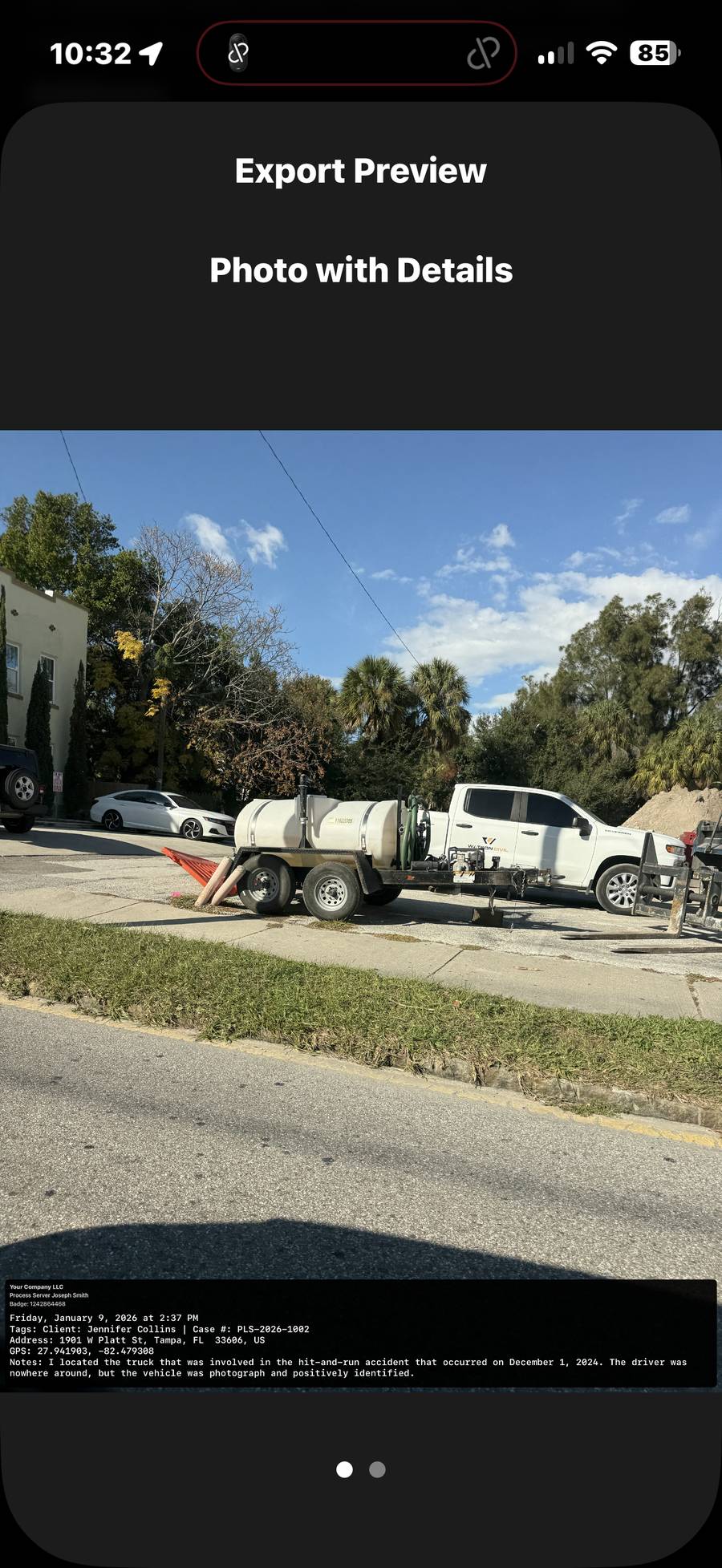
Burn your agency name, investigator title, GPS coordinates, address, timestamp, case details, and investigator notes directly onto exported photos and videos. Every export shows metadata permanently embedded in the image itself, with no separate file to lose or manage.

The burned export shows agency name, investigator title, exact timestamp, GPS coordinates, street address, client name, case number, and investigator notes — all permanently embedded into the image file.
When an attorney or insurance adjuster receives your export, the documentation is right there on the photo. No separate metadata file. No spreadsheet. Just the evidence with everything attached.
The same burned photo embedded in a clean single-page PDF report with agency header and full metadata block below.
Exported directly from Final Exhibit — timestamp, GPS, and case details permanently embedded in the video.
Recorded on iPhone and imported into Final Exhibit. GPS and timestamp burned in automatically.
Imported drone footage. The address was entered manually — the drone file did not include GPS metadata.
Imported from an Insta360 Go 3S via the Insta360 app. GPS and timestamp metadata preserved.
Add notes, date, time, location, and case details directly onto your exported video. Your original video always remains unchanged.
Choose exactly what appears on your export. Leave any field blank and it won't appear on the finished photo or video.
Document drive-bys, surveillance, inspections, and scene observations with professional evidence overlays on every export.
Final Exhibit Pro includes a built-in Route Planner designed for investigators, process servers, and other professionals working multiple locations in the field. Add up to 20 addresses, choose whether to optimize your route by distance or estimated driving time using Apple Maps routing information, and mark each stop complete as you work through the day.
Start with a selected starting address and add up to 20 stops. Choose to optimize by distance or estimated driving time. As you complete each location, mark stops off and tap to open navigation directly in Apple Maps. Final Exhibit displays your estimated total mileage and driving time to help you plan the day before you get on the road.
Your route can begin from a selected starting address with the option to return to that same location when the work is finished. Built for real field work — less time planning stops, more time completing them.
Choose starting address, add up to 20 stops, select optimization by distance or time.
Mark stops complete, open navigation in Apple Maps, see estimated mileage and driving time.
Final Exhibit Pro includes a customizable Forms Generator for affidavits, returns of service, statements, and other professional forms without forcing users into standardized language that may not apply in their jurisdiction.
Affidavit and process service forms begin blank and customizable. Users enter the terminology and language appropriate for their state, court, jurisdiction, agency, and business practices. Once your preferred language is established, Final Exhibit can use it when preparing future forms.
Complete the information manually in the field or at the office, preview the finished document, and generate a professional PDF for printing, saving, or delivery.
Forms can be signed directly inside Final Exhibit using a finger or Apple Pencil on iPhone or iPad, or a mouse or trackpad on Mac, allowing documentation to be completed in the field or later at the office.
With optional iCloud Sync, supported form information stays synchronized across your iPhone, iPad, and Mac using your personal Apple ID. Start preparing a form in the field and continue working from your Mac at the office. Your information remains under your control and is never stored on Final Exhibit servers.
Important: Final Exhibit provides customizable document preparation tools and does not provide legal advice or guarantee that any form or language satisfies the requirements of a particular court or jurisdiction. Users are responsible for verifying their forms, terminology, certification language, and service requirements before use.
Choose from affidavits, returns of service, statements, and other professional forms.
Enter jurisdiction, certification language, and terminology appropriate for your state.
Sign with finger, Apple Pencil, mouse, or trackpad. Optional iCloud Sync keeps work synchronized.
Real PDF reports generated inside Final Exhibit — with case summaries, evidence photos, GPS addresses, metadata, supporting documents, and invoices all in one professional package.
Agency branding, investigator credentials, case details, evidence count, and file summary — automatically formatted.
Photos embedded with GPS address, timestamp, client, case number, investigator notes, and tags.
Itemized invoices with hourly rates, mileage, paper service fees, and online payment links — included in every report package.
Final Exhibit brings many of the tools an independent field professional uses throughout an assignment into one professional workflow.
Import photos, video, screenshots, scanned documents, body camera footage, dash cam video, and drone media. Final Exhibit preserves available embedded metadata — GPS, timestamps, and camera information — when present in the file.
Group evidence into case files, assign to client profiles, add notes and tags, and search everything instantly — including text inside photos through automatic OCR.
Generate PDF and Word reports with investigator credentials, evidence photos, GPS maps, metadata, and signatures. Agency branding and logo available on Pro.
Choose your preferred export folder once in Final Exhibit Settings on Mac. Every individual item you export is automatically saved into a "Final Exhibit Exports" folder inside that location, ready to share using standard Apple sharing options.
Your evidence is not stored on Final Exhibit servers. By default, information remains on your device. Optional iCloud Sync uses your personal Apple iCloud account for supported synchronization.
Import video and permanently burn timestamp, GPS, address, investigator name, and agency branding directly onto the exported file.
Track billable hours, mileage, expenses, and paper service fees while generating professional invoices as PDF or Word with payment links — no separate billing software needed.
Every imported photo and scanned document automatically becomes searchable. Find license plates, VINs, names, addresses, or phone numbers in seconds.
Attach affidavits, contracts, court documents, and receipts directly to a case and include them in exports. Everything in one deliverable.
Every export — burned photo, video, PDF, or ZIP package — is created as a new file. Your original evidence remains untouched on your device, preserving its integrity.
A helpful bonus, not the main event. Draft observations, summaries, and descriptions with built-in AI — keeping you in control of every word.
Final Exhibit works with photos and videos from iPhone, iPad, drones, action cameras, dash cameras, body cameras, and many digital cameras. When a file contains embedded metadata, Final Exhibit reads and preserves the information available within that file.
| Source | Metadata Typically Available |
|---|---|
| iPhone and iPad Camera | Yes |
| AirDrop from Apple devices | Usually Yes |
| DJI, Insta360 and other camera apps | Varies by application and export method |
| Drones and drone applications | Varies by device, file type, and export method |
| Most action cameras | Varies by device and export method |
| Most digital cameras | Varies by manufacturer |
| MMS text messages | Usually No |
| Social media downloads | Often No |
| Screenshots | Limited |
| Edited or exported files | May be reduced or removed |
Final Exhibit preserves metadata that exists within the imported file. If a file does not contain metadata, Final Exhibit will not create or reconstruct information that is not present. Users can manually document dates, times, locations, and notes when needed.
Import evidence in the field on iPhone or iPad. Build a complete report right there on the spot, or switch to your Mac for a larger screen and expanded options. With optional iCloud Sync, supported information can stay synchronized across your Apple devices.
Field import and full reports. Photos, video, scans, GPS, and complete documentation — right from your pocket.
Organize cases, review evidence, and build reports on a larger screen — anywhere.
Full Command Center. Billing, reports, case management, and professional exports — including a dedicated export folder for quick sharing.
Mac version requires Apple Silicon and macOS Tahoe or later.
Final Exhibit Pro supports Apple Family Sharing, allowing eligible family members in your Family Sharing group to access the Pro subscription without purchasing a separate subscription. Each person's data stays private within their own iCloud account.
Final Exhibit was created by a disabled veteran, former Detective Sergeant, licensed private investigator, and process server — someone who spent years doing exactly what you do.
Final Exhibit was designed from real investigative and process service field experience, with the workflow built around the practical realities of documenting assignments.
The result is a tool that fits your workflow instead of forcing your workflow to fit the tool.
Patent Pending.
No high fees. No long-term contracts. Built for a straightforward field workflow.
Final Exhibit brings every part of professional field documentation into a single workflow.
A complete side-by-side breakdown of every feature.
| Feature | Free | Pro |
|---|---|---|
| Photos, scans, PDFs, screenshots | ✓ | ✓ |
| Automatic OCR and available metadata | ✓ | ✓ |
| GPS maps and reverse geocoding | ✓ | ✓ |
| Location and timestamp overlays: photos, scans, screenshots | ✓ | ✓ |
| Case files and organization | ✓ | ✓ |
| iCloud Sync — iPhone, iPad, Mac | ✓ | ✓ |
| Individual PDF exports | ✓ | ✓ |
| Client profiles | Up to 3 | Up to 500 |
| AI writing assistant | 5 / day | Unlimited |
| Video importing | ✗ | ✓ |
| GPS overlays: video | ✗ | ✓ |
| Report building | ✗ | ✓ |
| Batch exports and reports | ✗ | ✓ |
| Route Planner & optimization | ✗ | ✓ |
| Forms Generator | ✗ | ✓ |
| PDF and Word invoicing | ✗ | ✓ |
| Billing — hours, mileage, expenses | ✗ | ✓ |
| Supporting documents | ✗ | ✓ |
| Custom signature titles | ✗ | ✓ |
| Advanced agency branding | ✗ | ✓ |
| Family Sharing | ✗ | ✓ |
| Price | Free | $3.99/mo or $34.99/yr |
Start free. Upgrade when you're ready. No contracts. No commitments.
Final Exhibit Price Guarantee: Your subscription price stays locked in for as long as your subscription remains continuously active. Future price increases apply only to new subscriptions.
The guarantee applies while your subscription remains continuously active. If your subscription is canceled and later reactivated, or if you switch to a different subscription plan after a price increase, the then-current subscription price will apply.
Download Final Exhibit free and see how it can support your professional field documentation.
🍎 Download on the App Store — Free